Checking a Staging Site on Localhost Before It Goes Live
The best time to find out what a page sends is before it’s live. Watchkeeper opens a local copy as easily as a public site, so a developer can check a build on their own machine before anyone else loads it.
Start the staging server as usual, then point Watchkeeper at it. A local address needs its http:// written out:
watchkeeper http://localhost:8090/
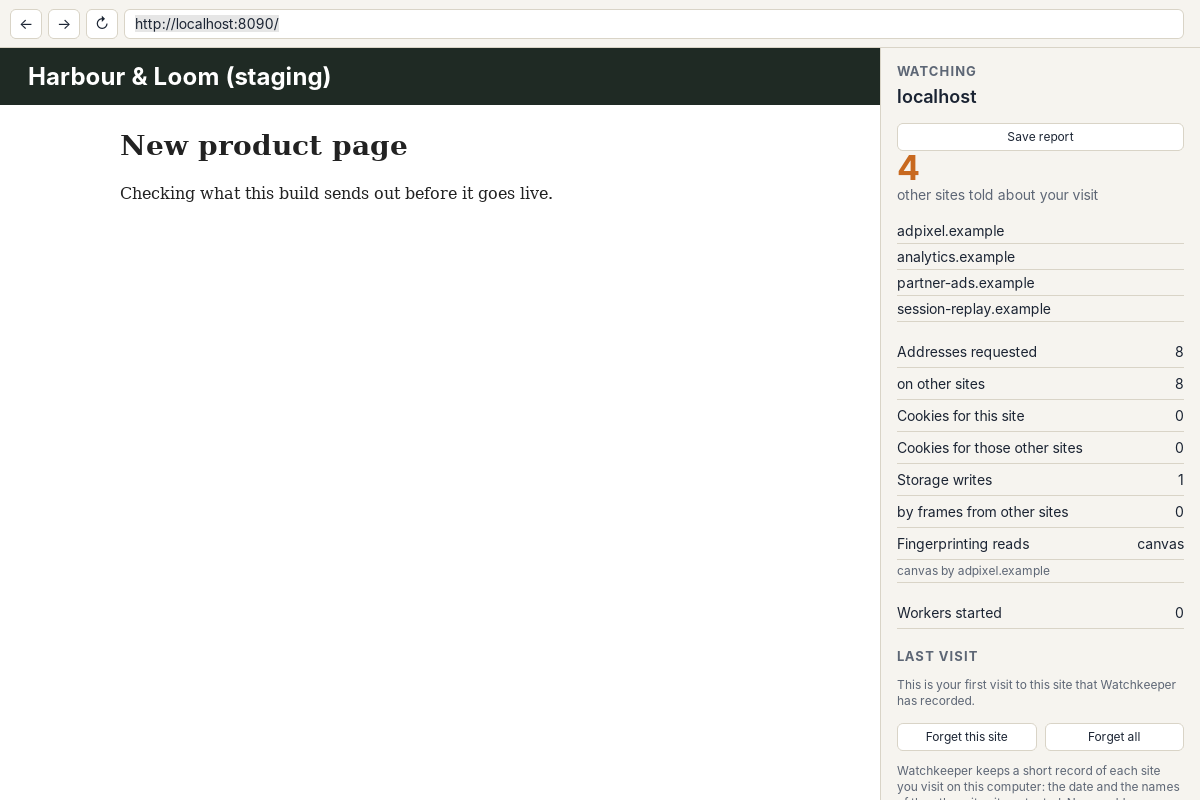
A made-up staging build. The session replay service is the one the team didn’t expect.
What to Look For
localhost counts as its own site, so everything the build calls on the internet lands in the other sites list. In this build there were four. Three were known from the live shop. The fourth, session-replay.example, is the kind of service a new plug-in brings in without anyone deciding to add it. It opens a WebSocket and records what visitors do on the page, which is worth a conversation before launch.
Save report writes the same list to a file, which fits in a pull request or a release checklist. Run the check again after each change and the Last visit section shows what’s new since the last build.
Try It
The staging page is one of Watchkeeper’s case study pages, served on a second port by the same script.