Sending a Landing Page Report to the Agency That Built It
Say a small software company paid an agency to build its sign-up page, and a customer asks a question nobody in the company can answer: which companies does your sign-up page send my visit to? This case study answers it for a made-up landing page.
Open the page in Watchkeeper and press Save report. You get two files: an HTML page anyone can open and a JSON file for tools. The HTML version starts like this.
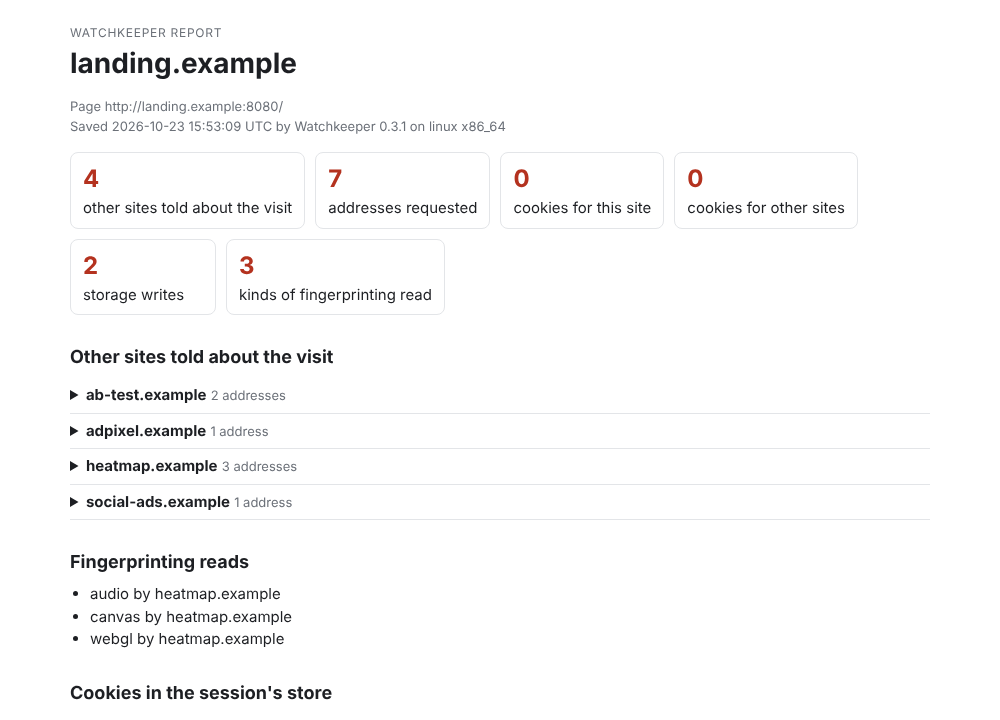
The report saved from the made-up landing page.
What the Report Showed
Four other sites heard about each visit. Two were conversion pixels from ad networks, one image each. One was an A/B testing service, which picked a version of the page and stored its choice in local storage. The fourth was a heatmap service that records where people click. It sent its data with a POST and kept a WebSocket open, and it was also the only script that made fingerprinting reads: a canvas, the graphics card through WebGL and an offline audio context.
A company that only wanted to see where people click may not know its heatmap tool fingerprints visitors too. The report makes that plain.
Why a Report Helps
A screenshot of a browser’s developer tools is a wall of addresses. The report groups them by site, names who made each fingerprinting read and lists what Watchkeeper can’t see, so the agency can’t wave it away as incomplete without saying what’s missing. It holds names and addresses only. Query strings, cookie values and storage values are left out, and cookies that other sites left earlier in the session are counted, never named. The HTML has no scripts and loads nothing when it’s opened.
Once the agency changes something, a second report saved the same way shows the difference line by line.
Try It
The landing page is one of Watchkeeper’s case study pages. The reference describes every field in the JSON.